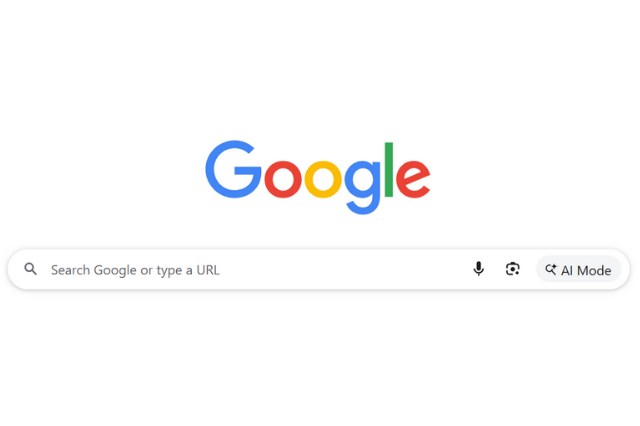
You’ve probably seen the phrase “Search Google or type a URL” on your web browser’s address bar especially when you open Chrome or a new tab. But have you ever wondered what it actually means? Should you search Google for something or just type a web address directly?
In this updated 2025 guide, we’ll explain the difference between search and URL entry, how modern browsers like Google Chrome handle both, and what this means for voice search, and AI search.

What is URL Search vs. Google Search?
When we talk about searching the web, it’s important to understand the two key approaches:
1. Search Google or Search the Web
The first option involves using a search engine like Google. When you type a query into the Google search bar, Google performs a search to give you relevant results based on keywords. The search results could include websites, articles, images, videos, or even maps, depending on what you’re looking for. Google is an excellent tool for broad queries or when you don’t know the exact web address of a site.
For example, if you type “best digital marketing Comapny near me”, Google will show a variety of results related to Italian restaurants in your area, including reviews, business listings, and even Google Maps locations.
2. Type URL or Enter Web Address
Alternatively, if you already know the exact address of the website you’re trying to visit, you can simply enter the URL directly into the browser’s address bar. This method bypasses the need for any search engine and takes you straight to the website.
For instance, if you’re looking for the official website of Webnizers, you can type www.webnizers.com directly into the URL bar, and the browser will take you there without any intermediary search.
Key Differences: Search Google vs. Type a URL
| Factor | Search Google | Type a URL (Enter Web Address) |
| Purpose | To find information, discover new websites, or explore options when you don’t know the exact address. | To go directly to a specific website you already know. |
| Speed | Slightly slower – Google must show search results before you click a link. | Faster – takes you straight to the desired site without extra steps. |
| Precision | Broader – may show multiple results, ads, or similar sites. | Exact – loads the specific page you requested. |
| When to Use | When researching, comparing, or discovering something new. | When revisiting or accessing a known brand or service. |
| SEO Impact | Generates organic search traffic – helps sites grow visibility and keyword rankings. | Counts as direct traffic – shows brand loyalty and recognition. |
| User Experience | Great for exploration and learning. | Great for efficiency and repeat visits. |
| Example | Typing “best digital marketing company near me” shows a list of search results. | Typing www.webnizers.com takes you directly to Facebook. |
What Does “Search or Type URL” Mean for User Experience?
The ability to search or type a URL into the browser’s address bar is part of a broader concept of user experience (UX). Users often have different preferences based on their needs:
- Search-oriented users are those who enjoy discovering content and exploring the web through search engines.
- URL-oriented users know exactly where they want to go and prefer the speed of directly typing a URL.
Today, most browsers and search engines are designed to seamlessly blend both methods. For example, if you start typing a web address into the address bar but stop before finishing the URL, the browser might try to complete it for you or switch to a search mode. This user-centric feature makes navigation smoother.
Which is Best for SEO- Search Google or Type URL?
If you are a website owner or an SEO professional, you might wonder how the two approaches impact website traffic and SEO. Let’s break it down:
1. SEO Benefits of URL Searches
When users type in a URL directly, they are more likely to return to your site repeatedly. This kind of traffic is often referred to as “direct traffic” and is a sign of a loyal audience. Direct traffic is usually an indication of strong brand recognition, and it’s often seen as a positive factor in SEO.
2. SEO Benefits of Search Engine Queries
Search traffic is the bread and butter of online visibility. When users search for specific terms and land on your website through search engine results, it indicates that your site has been properly optimized for relevant keywords. The key to ranking well on Google involves search engine optimization (SEO), ensuring that your content is visible when users search for the terms you want to rank for.
Therefore, while both methods (direct URL access and search engine queries) are important, search engine queries typically have a more direct impact on your site’s organic search performance..
How Does This Affect SEO and Website Traffic?
This part is important for business owners and digital marketers.
When people search Google and click your site from search results, it counts as organic traffic. That means your site is ranking for certain keywords, which is great for SEO (Search Engine Optimization).
But when people type your URL directly, it counts as direct traffic. This means they already know your brand – maybe they’ve visited before, bookmarked it, or heard about you elsewhere.
- Search Traffic = Great for growing your visibility and attracting new users.
- Direct Traffic = Great for building brand loyalty and repeat visitors.
Both are valuable. A healthy website usually has a balance of both.
Now Comes Voice Search- What is this?
We used to only search by typing or enter URLs manually, but now there’s a third option – voice search.
With voice assistants like Google Assistant, Siri, Alexa, and Cortana, you can now search the web just by speaking.
Instead of typing in “best pizza near me,” you can simply say:
“Hey Google, find the best pizza near me.”
And within seconds, you get results – no typing required.
How Voice Search Fits In
Voice search is essentially an extension of Google search, but it’s powered by natural language. Instead of typing short keywords like “cheap hotels Paris,” people use full sentences like “Where can I find cheap hotels in Paris?”
This change means:
- People are searching more conversationally.
- Results are more localized and specific.
- Websites need to optimize for voice search by using natural language and answering common questions clearly.
Examples of Voice Commands
- “Search Google for chocolate cake recipes.”
- “Open www.youtube.com.”
- “Go to Facebook.”
- “What’s the weather today?”
As you can see, voice search can either perform a search or open a URL, just like typing – but hands-free.
The Rise of AI Search
The internet is entering a new phase – AI-powered search. Google has introduced AI Overviews (also known as Search Generative Experience or AI mode) to make searches smarter and faster.
What Is AI Search in Google?
AI search uses artificial intelligence to summarize answers directly on the results page, instead of just showing a list of links.
For example, if you search:
“What’s the best laptop for graphic design in 2025?”
Instead of only showing 10 blue links, Google’s AI Overview may appear at the top with a quick, AI-generated answer summarizing the key points – along with product links and sources.
How It Works
- You type (or speak) your query.
- Google’s AI scans multiple websites and provides a concise answer right on the search page.
- You can still scroll down to view traditional search results if you want more detail.
This AI mode combines the best of both worlds – search + intelligence – giving you instant, trustworthy insights.
Why AI Search Is Important
- It saves time by delivering direct, summarized information.
- It uses advanced natural language understanding to interpret context.
- It gives users a more interactive, conversational experience.
As AI search grows, users might rely less on typing long queries and more on asking natural questions – just like talking to a person.
Conclusion
The choice between searching Google or typing a URL into the address bar depends largely on your intent:
- Search Google or Type URL: Ideal when you’re exploring the web or don’t know exactly where you want to go.
- Enter URL: Perfect when you already know the specific website you want to visit and want to get there quickly.
Both methods serve their purpose, and browsers today allow us to seamlessly transition between the two. Understanding how and when to use each approach will enhance your browsing experience, whether you’re a casual user or a digital professional.By knowing when to search and when to type.
FAQs
1. What does “Search Google or type a URL” mean?
It means you can either search for something on Google or go directly to a website by entering its URL in the address bar.
2. What’s the difference between search and enter URL?
Searching helps you discover new sites or information, while entering a URL takes you straight to a known website.
3. What is voice search?
Voice search lets you speak your query instead of typing. It’s faster and often used on phones or smart devices.
4. What is AI search or AI mode in Google?
AI search uses artificial intelligence to give quick, summarized answers directly on the Google results page.
5. Which is better search, voice, or typing a URL?
Each has its use: search for exploring, voice for quick hands-free results, and typing a URL for direct access to a known site.